
Numero: Number - Data - Call
Smarteletec S.L.Communication
4.19.61K Reviews
- Version
- 18.70
- Installs
- 10.00M
- Age Rating
- Everyone
Screenshots
Our Review of Numero: Number - Data - Call
 Analysis by Appyee
I think Numero is easiest to judge by its travel eSIM and virtual-number idea: it puts a way to get mobile data and a separate calling identity into an app, rather than asking you to manage every need through your regular SIM. That combination can be useful, but it is not automatically a replacement for a normal mobile plan. I’d see it as a practical extra for particular trips or communication needs, with the details of each option worth checking before relying on it.
Using Numero for a separate connection
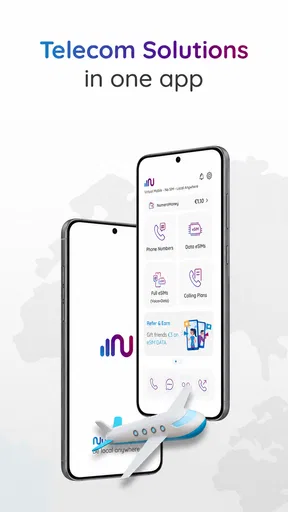
So, I dove right into Numero after downloading it from the app store. The installation was smooth, and I was up and running in no time. The interface is clean and intuitive, which is always a plus in my book. You don’t need a PhD in tech to navigate this app. Within a few taps, I was already exploring its features.
Why a travel eSIM changes the routine
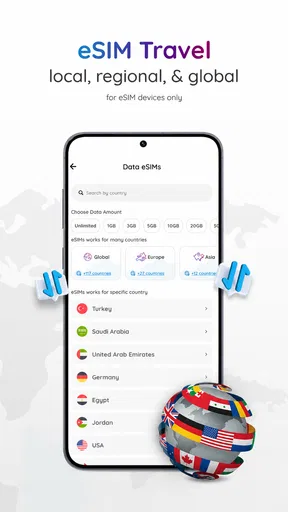
The most useful way to think about a travel eSIM is as a second route to mobile data when you are away from your usual setup. Instead of treating travel connectivity as one more physical SIM to keep track of, the app gives you a digital option to consider. For someone who travels occasionally, that can make planning feel simpler: you can look into a connection before departure instead of waiting until you arrive and trying to solve everything at an airport counter.
That convenience has a trade-off. An eSIM does not make every phone compatible, and the useful choice depends on where you are going and what you need to do online. Before buying anything, I would check that the device supports eSIM and compare the available destination coverage and package terms with the length and purpose of the trip. The key is to treat Numero as a travel tool to evaluate, not assume that installing it alone guarantees a working connection everywhere.
A realistic travel-day workflow
Imagine landing in a new country with a hotel address, a train connection to catch, and messages waiting from the people you are meeting. A travel data option can help with the practical first steps: checking directions, contacting a host through an internet-based service, or looking up a change in plans. I would arrange the connection before the trip, then keep the usual SIM available for whatever role it still needs to play. That way, I am not forced to make a rushed choice while tired and trying to find a signal.
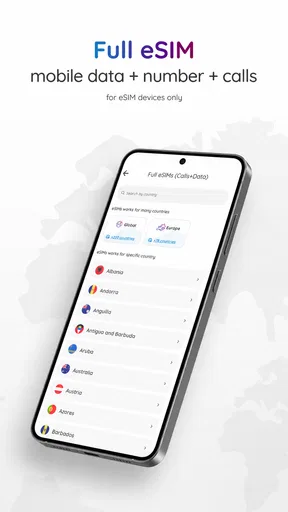
One detail people often overlook is the difference between having data and having a familiar phone number. A data connection can support online communication, but it should not be assumed to give you the same calling identity or reach as your regular number. If a bank, workplace, or family member must reach you by ordinary phone call or text, think through that separately. A virtual number may help with a distinct calling role, but it is sensible to confirm the relevant number’s country and intended use before giving it to important contacts.
Keeping a virtual number useful
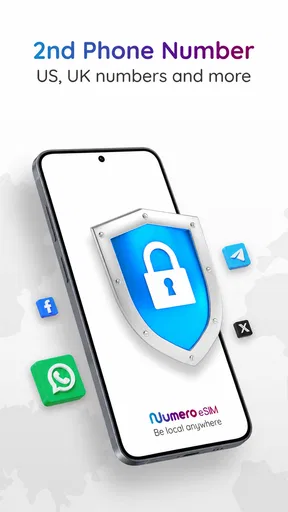
The virtual-number option is most compelling when you have a reason to separate communication rather than simply collect another number. For example, a freelancer who wants a contact number for client enquiries may prefer to keep that role apart from personal calls. Likewise, someone arranging a temporary project can share a dedicated number for that purpose instead of handing out their everyday one. The benefit is organizational: you can decide which number to give to which group, then keep those conversations mentally distinct.
That separation only helps if you use it consistently. I would choose a clear purpose for the extra number, tell the relevant people which one to use, and avoid spreading it across unrelated accounts. If you are using it for work, set expectations about when you will respond; a second number cannot create boundaries by itself. And if you need a number for account verification, emergency contact, or a service with strict phone-number requirements, check compatibility first rather than assuming every service accepts a virtual number.
Where it sits beside ordinary alternatives
Compared with roaming on a regular carrier plan, a travel eSIM may be a more focused option when you mainly need data and want to consider a separate travel connection. Carrier roaming can be easier for people who value continuity and do not want to configure another service, especially if their plan already suits the destination. A local physical SIM can also be a good fit for a long stay or someone who wants a local carrier relationship, though it involves handling a physical card and checking the local options. Numero’s appeal is the app-based route, not a promise that it will beat every carrier or local offer.
For virtual numbers, the closest alternative may be using a second SIM or a dedicated business phone. A second SIM can keep a number tied to a carrier, while a separate handset gives a stronger physical boundary between work and personal life. Those choices may suit people who need dependable carrier-based calling or strict separation. Numero is more appealing if you want to explore a virtual number without carrying another device, but the right choice depends on how important ordinary calling, local availability, and long-term number continuity are to you.
Features That Stand Out
First off, the app allows you to manage multiple virtual numbers. This is super useful if you’re running a small business or just need separate numbers for personal and professional use. No more juggling multiple devices or SIM cards—just one app to rule them all!
Another cool feature is the data management. It offers a neat way to keep track of your data usage without having to dig through your phone settings. If you're like me and constantly worried about hitting data caps, this feature will become your new best friend.
Oh, and did I mention the call recorder? This feature is a lifesaver for anyone needing to review past conversations. Whether it's for work or just keeping track of important personal calls, the recorder is easy to use and integrates seamlessly with your call logs.
Usability and Performance
Now, onto the real-world performance. Numero runs smoothly without any noticeable lags. I’ve tried it on both Android and iOS, and it performs like a charm on both platforms. Calls are crystal clear, and the data tracking is spot-on. It’s like having a trusty sidekick in your pocket.
Customization options are also plentiful. You can tweak your settings to match your personal style, which I think is a nice touch. From choosing your preferred themes to setting call reminders, the app lets you tailor the experience to your liking.
For a more useful day-to-day routine, I would check data consumption before a trip and again after a day of navigation, messaging, and browsing. That gives you a better sense of whether your habits match the package you chose than relying on a vague guess. I would also keep heavy downloads and video streaming for Wi-Fi when practical; travel data is most valuable when you need it on the move, not when a large background task quietly uses it.
Cost, compatibility, and expectations
Numero is free to install, but some options are offered as in-app purchases, with individual items ranging from under a dollar to well over two hundred dollars. I would not treat the free download as proof that the specific number or data option I want is included at no cost. Before confirming a purchase, read the displayed package details carefully, especially the destination, duration, and what the option covers. That small pause is more useful than choosing quickly based on the app’s general purpose.
The app is rated for Everyone, and it comes from Smarteletec S.L. Its current version is 18.53, and it requires Android 9 or later on Android devices. Those details matter if you are installing it on an older phone or setting it up for someone else. On iPhone, I would still check the App Store’s device requirements directly before planning a trip around it, rather than assuming Android compatibility details apply across platforms.
There is a substantial audience for the app: it has a 4.2 average from around 138,000 ratings, with over 10 million installs. I take that as a sign that many people are interested in this kind of combined travel and calling utility, not as a guarantee that every package will suit my destination or that every feature behaves identically on every device. The app first appeared on November 14, 2017, and the version number shows that it has continued to evolve, but I would still judge it by the specific options available when I need it.
Usability and Performance
Now, onto the real-world performance. Numero runs smoothly without any noticeable lags. I’ve tried it on both Android and iOS, and it performs like a charm on both platforms. Calls are crystal clear, and the data tracking is spot-on. It’s like having a trusty sidekick in your pocket.
Customization options are also plentiful. You can tweak your settings to match your personal style, which I think is a nice touch. From choosing your preferred themes to setting call reminders, the app lets you tailor the experience to your liking.
Security and Privacy
In today’s world, security is a big deal, and Numero doesn’t skimp on that. It offers robust encryption to protect your calls and data. I checked their privacy policy, and they seem pretty committed to keeping user data safe. This is a huge relief if you’re concerned about privacy issues, which, let’s be honest, we all are these days.
For privacy-conscious use, I would still be deliberate about what number I share and with whom. A separate number can reduce how often you give out your personal one, but it does not make every conversation anonymous or remove the need to review an app’s permissions and privacy terms. I would also avoid relying on a virtual number as the only way to recover important accounts until I have confirmed those services accept it and I understand how I can keep access to it.
Who gets the most from it
I can see Numero working best for travelers who want to explore a digital data option, people who value a separate contact number, and small-business owners who want a lightweight way to divide personal and professional calls. It may also suit someone who travels often enough to appreciate having connectivity choices in one place but does not want to carry a second phone just to keep a distinct calling role.
I would skip it if you need one guaranteed, carrier-backed number for every bank, emergency contact, and work system, or if you prefer not to manage purchases and package conditions inside an app. It is also not the obvious choice for a long-term local connection when a local carrier plan better matches your needs. In those cases, a regular mobile plan, a second SIM, or a dedicated work phone may offer the predictability you care about more than convenience.
Why You Should Try Numero
At this point, you might be wondering if Numero is worth your time. Well, if you’re looking for a reliable app to manage your calls and data, I’d say give it a shot. It’s packed with features that are not only practical but also easy to use.
Plus, the app is frequently updated, which means the developers are actively working on improvements and new features. They seem to listen to user feedback, which I appreciate because it shows they care about the user experience.
In conclusion, Numero: Data, Numbers, & Calls is a solid app that offers great functionality for anyone needing a bit more control over their calls and data. Whether you’re a busy professional or just someone who likes keeping things organized, this app might just be what you need. So, go ahead and give it a whirl. Who knows, it might just become your new favorite app!
Verdict
Strengths of Numero: Number - Data - Call
- Intuitive interface for easy navigation.
- Customizable number options available.
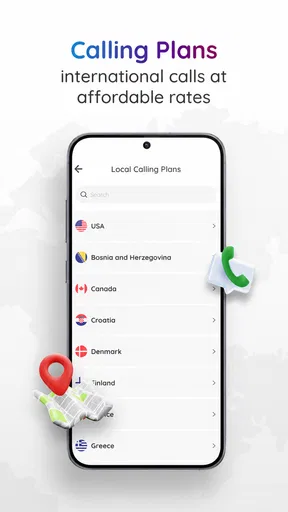
- Offers affordable international calling rates.
- Secure data storage and privacy features.
- Supports multiple languages for global users.
Limitations of Numero: Number - Data - Call
- Limited free features, many are paid.
- Occasional connectivity issues reported.
- Requires internet for full functionality.
- Some users find ads intrusive.
- Not all features available in every region.
Similar Picks in This Category
View All
Google Messages
Google LLC4.6

Gmail
Google LLC4.1

Google Meet
Google LLC4.4

Google Chrome
Google LLC4.1

WhatsApp Messenger
WhatsApp LLC4.6

Carrier Services
Google LLC4.2
Frequently Asked Questions
What features does Numero offer for managing calls and texts?
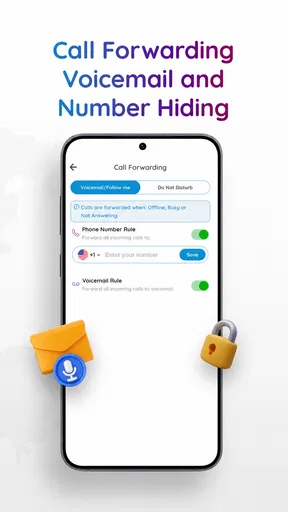
Numero provides users with a comprehensive suite of features for managing calls and texts, including virtual phone numbers from multiple countries, call forwarding, and voicemail services. This means you can maintain privacy by using a different number for various activities, such as business, travel, or personal use, without needing multiple physical SIM cards.
Is Numero available for both Android and iOS devices?
Yes, Numero is available for download on both Android and iOS platforms. The app is designed to offer a seamless experience across devices, allowing users to access their virtual numbers, manage calls, and send texts effortlessly, regardless of the operating system they are using.
How secure is my data when using Numero?
Numero places a high priority on user privacy and data security. The app employs robust encryption protocols to ensure that your calls, texts, and personal information are protected. Furthermore, the app does not require access to your personal contacts, enhancing its commitment to safeguarding your privacy.
Can I use Numero for international calls and texts?
Yes, Numero supports international calls and texts, allowing you to connect with friends, family, or business contacts around the globe. By providing virtual numbers from various countries, it enables you to make calls at local rates, potentially saving on international calling costs.
Are there any subscription fees or in-app purchases in Numero?
Numero operates on a freemium model, offering basic functionalities for free while providing additional features and virtual numbers through in-app purchases or subscription plans. Users can choose the level of service that best suits their needs, whether it's occasional use or more frequent, business-oriented activities.
